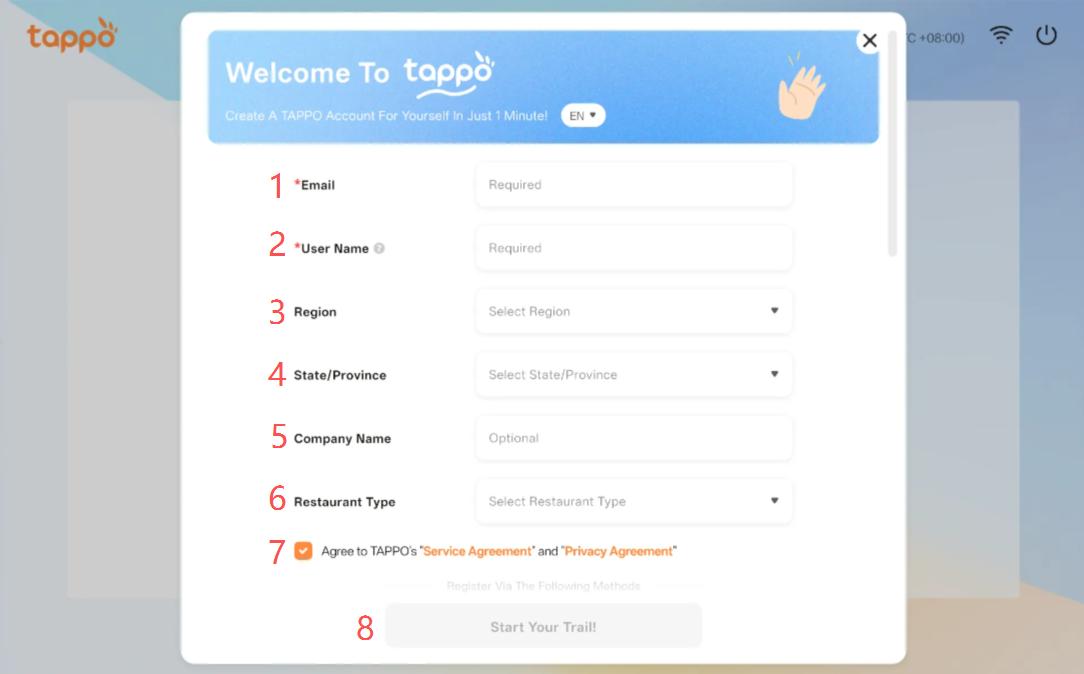
On the POS device binding page, click [Register Account] to pop up the registration window above. See details in Section 1.1: Enter Device Code to Bind Device.
1. Email Required. Enter your personal registration email.
2. Username Required.Enter your personal username.
3. Region Required.
4. State/Province Required.The selection entry will be displayed after selecting the [Region].
5. Company Name Optional.
6. Restaurant Type Optional.
7. Service Agreement and Privacy PolicyMandatory Must be agreed to.
8. Start Trial After completing the required fields, click [Start Your Trial] to finish registration. After registration, the system will automatically send TAPPO account information to the entered email.